What is an editable content system?
An editable content system gives your team controlled ways to update the site after launch without breaking layouts, navigation, accessibility basics, or reusable design patterns.

A content system is more than a CMS login
A website that looks good on launch day can still become hard to manage if every update requires custom layout work. An editable content system turns common publishing needs into stable templates, reusable sections, clear content models, and practical ownership rules.
A CMS gives editors a place to manage content. A content system defines what can be edited, how entries are structured, which fields are required, how assets should be prepared, and how those entries appear across the website.
Good systems protect the important parts of the experience while giving teams useful control. Editors should be able to update content without guessing how spacing, hierarchy, mobile layouts, metadata, or accessibility labels are supposed to work.
Editable does not mean unrestricted
The best content systems give editors the right controls, not unlimited controls. Too little control creates bottlenecks. Too much control creates inconsistent pages, broken layouts, missing metadata, and content that no longer matches the brand.
Editable systems work best when the reusable parts are intentionally designed. The team can create new resources, update services, change calls to action, revise team pages, add case studies, and manage landing pages while the structure of the site remains stable.
- Editors can update common content without touching code or layout structure.
- Reusable fields keep titles, summaries, images, categories, buttons, and metadata consistent.
- Design-critical areas stay protected so spacing, hierarchy, and responsive behavior do not drift.
- Risky changes such as navigation, global components, scripts, and templates remain intentional.
- Support needs are clearer because the team knows what is editable and what requires developer help.
Reusable templates reduce maintenance friction
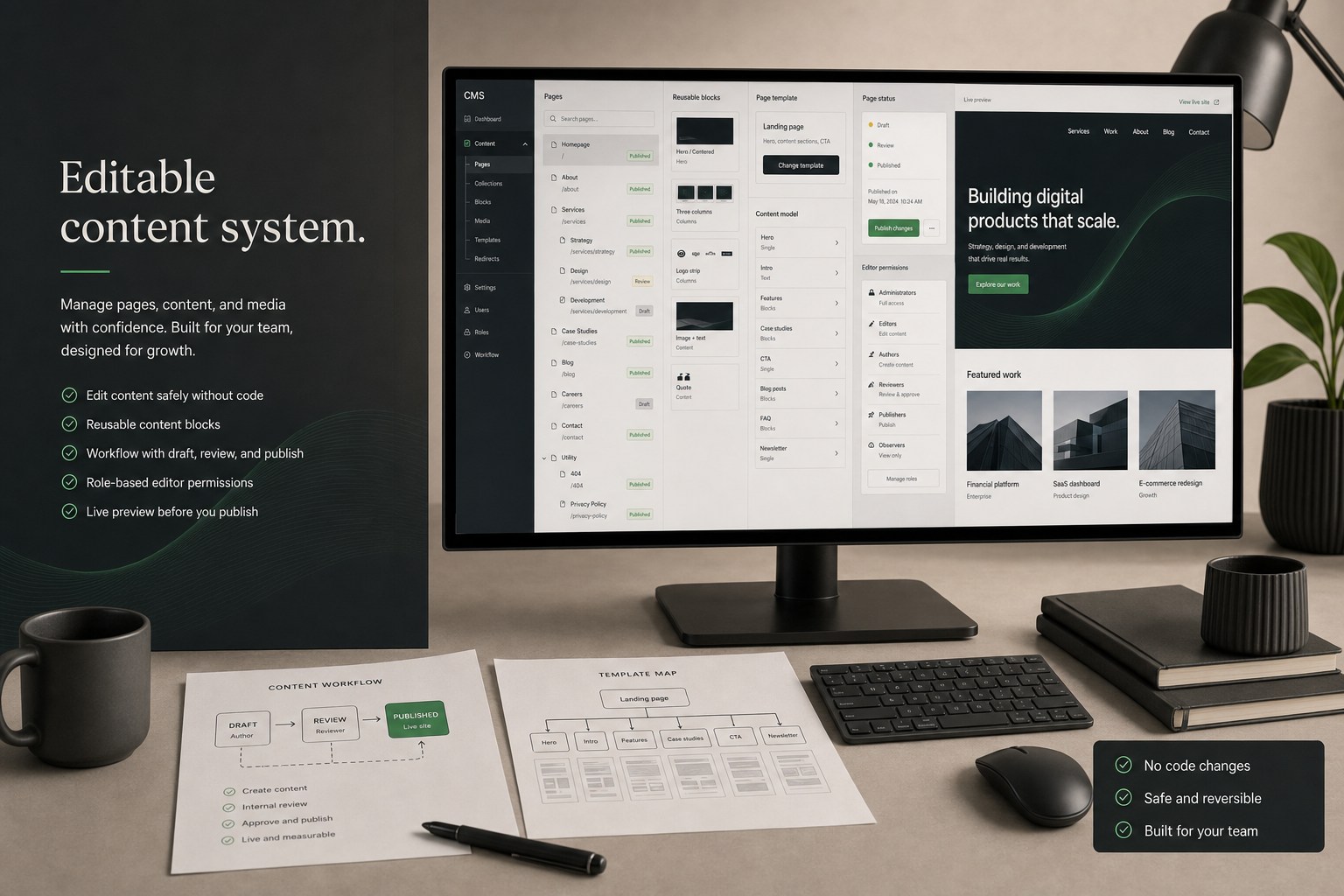
Templates are the foundation of an editable site. They help the team create similar content without rebuilding the same layout repeatedly. A service page, resource article, case study, location page, or landing page should not need to be redesigned from scratch every time.
- Page templates create repeatable layouts for services, resources, case studies, landing pages, locations, and team profiles.
- Content fields keep titles, summaries, images, CTAs, metadata, categories, authors, dates, and related links consistent.
- Reusable sections let teams add approved blocks without rebuilding the page.
- Responsive rules keep content usable when text length, image size, or card counts change.
- Editorial limits help prevent oversized headings, missing images, empty cards, or awkward mobile layouts.
Content models make publishing predictable
A content model explains what information belongs in each content type. It is the difference between a CMS full of random fields and a system editors can understand. When the model is clear, content is easier to add, filter, search, reuse, and maintain.
- Service entries can include page title, short summary, hero copy, proof points, FAQs, related services, and call-to-action settings.
- Resource entries can include author, category, topic, date, reading summary, SEO description, feature image, and related posts.
- Case studies can include industry, challenge, work performed, outcomes, screenshots, and credibility details.
- Location pages can include address, service area copy, local metadata, contact details, and region-specific content.
- Reusable content blocks can support testimonials, stats, comparison tables, process steps, downloads, and notices.
Governance keeps the site trustworthy
Trust comes from consistency. When content owners understand what they can change, where assets belong, and how publishing affects navigation, SEO, accessibility, and conversion paths, the website is less likely to become fragmented over time.
The system should make the common update easy and the risky update intentional. Editors need freedom, but the website still needs guardrails.
- Clear ownership for pages, resources, images, metadata, forms, and legal or compliance-sensitive copy.
- Review expectations for new pages, major copy changes, redirects, navigation updates, and campaign launches.
- Asset rules for image size, alt text, file names, compression, and visual consistency.
- Publishing rules for drafts, approvals, scheduled updates, retired content, and expired offers.
- Maintenance rules for broken links, outdated pages, archive cleanup, and content quality reviews.
Accessibility defaults should be built into editing
Accessibility is easier to preserve when the CMS encourages good habits. Editors should not have to remember every technical rule every time they publish. The system should support accessible structure by default wherever possible.
- Heading fields that preserve hierarchy instead of encouraging random heading choices.
- Alt text workflows for meaningful images and guidance for decorative imagery.
- Button and link fields that encourage clear, descriptive link text.
- Required labels and helper text for reusable form or CTA components.
- Component patterns that preserve keyboard-friendly structure and readable contrast.
SEO and social sharing depend on good fields
Editable systems should support the details that help pages perform after publishing. Metadata, summaries, slugs, canonical expectations, social images, and internal links need predictable places to live.
When these fields are missing or unclear, teams publish pages that look acceptable but are harder to find, harder to share, and harder to measure.
- SEO title and meta description fields for important content types.
- Slug and URL guidance so pages stay readable and consistent.
- Open Graph image and summary fields for social previews where relevant.
- Category, topic, and tag fields that support filtering and related content.
- Internal-link fields that help connect resources, services, case studies, and conversion pages.
Editor handoff should be practical
A content system is only useful if the team knows how to use it. The handoff should explain the common publishing tasks, what fields control, what should not be changed casually, and when to ask for support.
- How to create, edit, preview, publish, unpublish, and archive common content.
- Which templates are available and what each one is designed to support.
- Which image sizes, naming patterns, and alt text expectations to follow.
- Which fields affect SEO, social sharing, navigation, filtering, and related content.
- What requires developer support, such as new template logic, integrations, scripts, or structural changes.
What you should receive
A good editable content system should arrive with structure, not just credentials. Your team should understand how content is meant to be managed and where the guardrails are.
- Editable templates for core page types your team can understand.
- Content model notes that explain key fields, required fields, and reusable components.
- Content ownership notes that explain what editors can update and what needs support.
- Publishing guidance for adding, revising, reviewing, retiring, and publishing common content.
- Guardrail recommendations for future content, design, accessibility, SEO, and maintenance needs.
Conclusion
A strong content system keeps the website useful after launch. It lets teams publish with less friction while protecting the design, structure, metadata, and accessibility foundations that make the site trustworthy.
The goal is not to give editors every possible control. The goal is to give them the right controls, clear guidance, and a system that can grow without becoming messy.